Showing posts with label SharePoint 2010. Show all posts

Tuesday, September 8, 2015

SharePoint change context menu to other column instead of Title column in View pages

In SharePoint, we can create new View for Lists and Libraries and select the columns that we want to show.
Most of us do not use Title column in List / Libraries. Therefore in views, we use to hide the Title column and SharePoint OOTB provides the context menu for Title column.
Then how does the business user handle the item without context menu !!!!!!!!!! ?

Solution: We need to customize the view in SharePoint Designer.

1. Open the view in Designer (Eg: AllItems.aspx)
2. Goto view and identify your column. Here I have chosen "CustomColumn".
3. Add the below lines inside FieldRef of that column.

LinkToItem="TRUE" LinkToItemAllowed="Required" ListItemMenu="TRUE"

4. Save the view. That's it !!!!! :) 

Friday, June 26, 2015

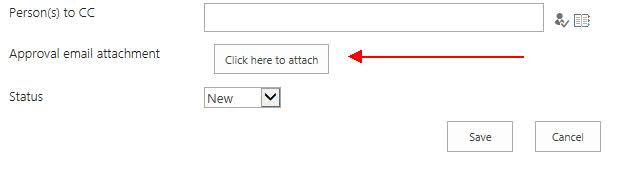
SharePoint custom list form with custom attach file button

I had a requirement where user wanted to attach a file to list item. Well, that's normal thing for user and easy too but they do not want to click the "Action file" button at Ribbon.

User wanted a button on list form to attach a file !!!!!!!!!!!

Being a master in jQuery, I thought I would be able to grab the click function and assign it to custom button. I was trying trying trying..... > <  Uuh ! No use with several tricks performed. 

Later I came across a SharePoint javascript function "UploadAttachment()". Boooooooom ! It's done.
Very easy solution. 

<input type="button" value="Click here to attach" onclick='UploadAttachment()'></input>

Custom list form:


Friday, March 22, 2013

Getting Query String Values using JavaScript in SharePoint


The JSRequest class is a JavaScript object that lives on all SharePoint Pages, and allows us to simply and quickly get query string values using JavaScript.

It has 3 fields: QueryString, FileName, and PathName.
  • QueryString - is an array of key\value pairs representing the current query string parameters.
  • FileName - is a string containing the current name of the current page.
  • PathName - is the server relative path of the current page.
Usage:

//First we must call the EnsureSetup method
JSRequest.EnsureSetup(); 

//Get a query string parameter called Id. i.e - "page.aspx?Id=11" will return 11
itemId = JSRequest.QueryString["Id"];

//Get the current page name. i.e - "default.aspx"
itemId = JSRequest.FileName;

//Get the current path name. i.e - "/itaysk/doclib/default.aspx"
itemId = JSRequest.PathName;


Ref: http://blogs.microsoft.co.il/blogs/itaysk/archive/2008/11/30/getting-query-string-parameters-with-javascript-in-sharepoint.aspx

https://www.nothingbutsharepoint.com/sites/devwiki/SP2007Dev/Pages/SharePoint%20JavaScript%20Functions%20Overview.aspx

Pass parameter to redirect url in GenFireServerEvent SharePoint 2010


Many users try to redirect the page to custom page with custom query string after clicking the save button in list forms. Most of the websites give below solution to use custom button which just redirect to page.


Instead of using the default sharepoint buttons:

<SharePoint:SaveButton runat="server" ControlMode="Edit" id="savebutton1" Text="OK"/>

<SharePoint:GoBackButton runat="server" ControlMode="Edit" id="gobackbutton2"/>


replace them with this:

<input type="button" class="ms-ButtonHeightWidth" value="OK" name="btnSave" onclick="javascript: {ddwrt:GenFireServerEvent('__commit;__redirect={}')}" />


<input type="button" class="ms-ButtonHeightWidth" value="Cancel" name="btnCancel" onclick="javascript: {ddwrt:GenFireServerEvent('__redirect={}')}" />


Note:
       - You can put any URL in __redirect={} that you want, for example __redirect={http://www.google.com} or __redirect={/news/PressReleases/}
       - There should be no quotes around the URLs passed into the __redirect directive.

The above solution works fine when you have static pages. But how can you pass parameter to redirect url? 

Consider; I have a page "listPage.aspx" with two radio button(View, Update), one save button and one cancel button. User opens "listPage.aspx" page and selects either View or Update radio button and clicks on save. I need to redirect the page based on the user selected value in query string like "Admin.aspx?action=<selected value>". 

Solution to pass parameter to redirect url:

1. Include jQuery reference in your list form using SharePoint Designer. In our case, page is "listPage.aspx".
2. Replace the SharePoint default buttons with input field. Eg: 

<input class="ms-ButtonHeightWidth" id="btnSave" onclick="javascript: {ddwrt:GenFireServerEvent('__commit;__redirect={}')}" type="button" value="OK" />


<input class="ms-ButtonHeightWidth" id="btnCancel" onclick="javascript: {ddwrt:GenFireServerEvent('__redirect={/Pages/Home.aspx}')}" type="button" value="Cancel" />


3. Place the below script inside contentplaceholders. [Tip: look for script tag in the page and place the code]

$(document).ready(function () {
  $("input:radio[name=theme]").change(function() {
    var value = $(this).val();
var onclick=$('#btnSave').attr('onclick');
onclick=onclick.split('{')[0]+'{/Pages/Admin.aspx?action='+value+'}\')';
$('#btnSave').attr('onclick',onclick);
});

});

Here "theme" is the radio button group name. 

Thats it !!!!! You are done!

The code 

var onclick=$('#btnSave').attr('onclick');
onclick=onclick.split('{')[0]+'{/Pages/Admin.aspx?action='+value+'}\')';
$('#btnSave').attr('onclick',onclick);

plays the trick, manipulates the button's onclick attribute value.

Wednesday, March 20, 2013

Enable Design view in Visual Studio 2010

I was creating a visual webpart using Visual Studio 2010 for SharePoint 2010 in dev server. After adding a Visual webpart to my SharePoint project, it showed me HTML Source page and there was no option for switching to Design page.

To Enable Design View:
1. Goto Tools -> Options in Visual Studio 2010
2. Navigate to HTML Designer -> General
3. "Check" the option Enable HTML designer
4. Restart the visual studio 2010


Heard that many developers face the same. Hope this info would be useful.  

Please find the below screen shot for reference;


Wednesday, March 28, 2012

Anonymous access to SharePoint 2010 list forms

You could have faced a strange issue when accessing SharePoint 2010 list forms on anonymous access. I have a Publishing Site with FBA authentication. I was using calendar control with overlays to display the events to all users. calendar control uses "DispForm.aspx" to display the event details to the user. But when anonymous users click on the Title, the page redirects to the Login form.

Its the problem with ViewFormPagesLockdown.

To overcome this problem, I executed the below code in PowerShell;

To determine if a site has ViewFormPagesLockdown enabled run the following:

get-spfeature -site http://sitecollectionURL

If ViewFormPagesLockDown is listed, it's enabled.


$lockdown = get-spfeature viewformpageslockdown

disable-spfeature $lockdown -url http://sitecollectionURL


If anonymous is already setup, you may need to disable\re-enable anonymous on the site.


Happy Coding :)